You can use your AI Engine environments and chatbots on third-party services using the public REST API. You also have the possibility of integrating your chatbot UI — along with its full configuration and connections — into any other website you want using cross-site script integration, even if it’s not running WordPress!
Cross-Site is a Pro feature — it only appears when AI Engine Pro is active. On the free version of AI Engine, the option is not shown anywhere.
If you’re interested in using your AI Engine environment and chatbots in external applications like Discord, WhatsApp, webhooks, and more, you’ll need to use the REST API. You can learn more about it here: AI Engine REST API.
1. Enable Cross-Site globally
Go to AI Engine → Settings and, in the Frontend Extras box (alongside AI Forms and Search), enable Cross-Site.
2. Configure the chatbot
Open the Chatbots tab and select the chatbot you want to embed. In that bot’s settings, open the Cross-Site section, enable the option there, and you’re done.
Note: the Cross-Site section appears for standard (shortcode) chatbots, not for chatbots used in Gutenberg block mode.
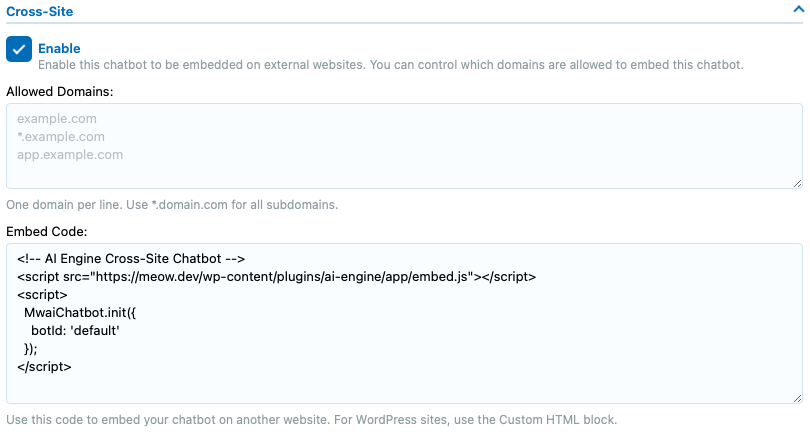
You need to register the domains on which you want to load the chatbot scripts. If you don’t do so, the script requests will be rejected due to CORS. This ensures your chatbots can’t be used without your consent by someone else trying to load the same scripts.
Now you can just copy and paste the “Embed Code” into any webpage you want.
If you’re doing this on WordPress, either insert it inside a script that is loaded or use a Custom HTML block in your post directly.
If you’re using it on a site that doesn’t run WordPress, make sure you don’t insert it as plain text — the content must be interpreted as HTML so the scripts can load properly.