If you want the chatbot to know information about your user, there is only one way: add this information to the current context. When it is in the context, the AI model knows it; when it is not, it does not. It is as simple as that. There are many different ways to add information to the context, and since we want this to be user specific, we will need to add it dynamically.
Built-in Placeholders
AI Engine already replaces a few placeholders in the instructions of your chatbots, with no code at all: {DATE_TIME} (the current date and time), and for logged-in users {DISPLAY_NAME}, {FIRST_NAME}, {LAST_NAME} and {USER_LOGIN}. With Content-Aware enabled, you also get {CONTENT}, {EXCERPT}, {TITLE} and {URL} for the current page. They are listed under the Instructions field of each chatbot. For visitors who are not logged in, the user placeholders are left as they are.
To add your own placeholder to this list, use the mwai_placeholders filter. The key is the placeholder name, without the curly braces:
add_filter( 'mwai_placeholders', function( $placeholders ) {
    // {MEMBERSHIP} will be replaced by the membership level of the user
    $placeholders['MEMBERSHIP'] = get_user_meta( get_current_user_id(), 'membership', true );
    return $placeholders;
} );
Instructions
If you need more control, you can create your own placeholders in the instructions and replace them yourself when they are passed to the AI model. Here is an example:
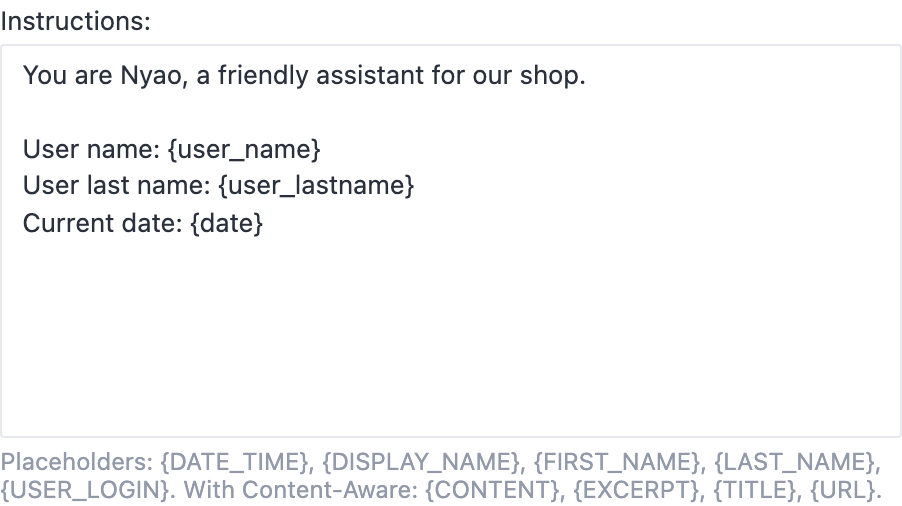
Then we use a filter that will be called to modify the instructions at run time. You can add this in Code Engine or any snippet management plugin.
add_filter( 'mwai_ai_instructions', function( $instructions, $query ) {

    // Check if the user is logged in
    if ( !is_user_logged_in() ) { return $instructions; }

    // Get current user info
    $user = wp_get_current_user();
    $user_name = $user->display_name;
    $user_lastname = $user->user_lastname;
    $date = date_i18n( 'F j, Y' );

    // Replace placeholders in instructions
    $placeholders = [
        '{user_name}' => $user_name,
        '{user_lastname}' => $user_lastname,
        '{date}' => $date
    ];

    $instructions = str_replace( array_keys( $placeholders ), array_values( $placeholders ), $instructions );

    return $instructions;
}, 10, 2 );
AI Forms
The mwai_ai_instructions filter is used for chatbots. If you want to achieve the same behavior for Forms, you should use the more general filter mwai_ai_query, which is triggered for any AI request.
You’ll need to modify $query->message, as this is where the prompt is stored:
add_filter( 'mwai_ai_query', function( $query ) {

    // Same code as above...
    $placeholders = [
        '{user_name}' => $user_name,
        '{user_lastname}' => $user_lastname,
        '{date}' => $date
    ];

    $instructions = str_replace(
        array_keys($placeholders),
        array_values($placeholders),
        $query->message
    );

    $query->set_message($instructions);

    return $query;
});
This way, your placeholders will be replaced directly in the prompt before it’s sent to the AI.
Function Calling
If you prefer not to have placeholders in your instructions for each chatbot that would need this information, you can always make a function that fetches your users’ information, so whenever it needs it, the chatbots can fetch the information by itself. You can find an example explained here: Function Calling Example