AI Engine can help you generate content for your website. However, at Meow Apps, we do not support the idea of fully AI-generated content. We believe this approach can create unnecessary content bloat on your site and across the internet. Additionally, purely AI-generated content can be easily detected by modern AI and web search tools, which may negatively impact your site’s SEO.
What we advocate instead is human-written content enhanced by AI assistance. AI should be used as a tool to help you work faster, write more clearly, and explore new ideas, not to replace human creativity and expertise.
With that in mind, here are some effective ways AI Engine can support your content creation workflow.
Content Generator
The Content Generator is not intended to be a tool for producing high-quality, publish-ready content. That’s why it is not receiving ongoing updates or advanced configuration options. Its primary purpose is educational: to help users explore ideas and experiment with AI-generated text.
You can open the AI Engine Dashboard and, under Admin Modules, enable the Content Generator.
You’ll also find a family of generator tools available for creating images and videos, allowing you to explore different types of AI-assisted content directly from the dashboard.

This will add a 🪄 Content section to the header of the AI Engine dashboard.
When you open this menu, you will see three sections arranged from left to right:
- Template / Topic Prompting on the left, where you can define the structure or idea for your content.
- Your Content in the center, where the generated text will appear and can be edited.
- Model Settings on the right, where you can adjust parameters such as the model, creativity level, and other generation options.
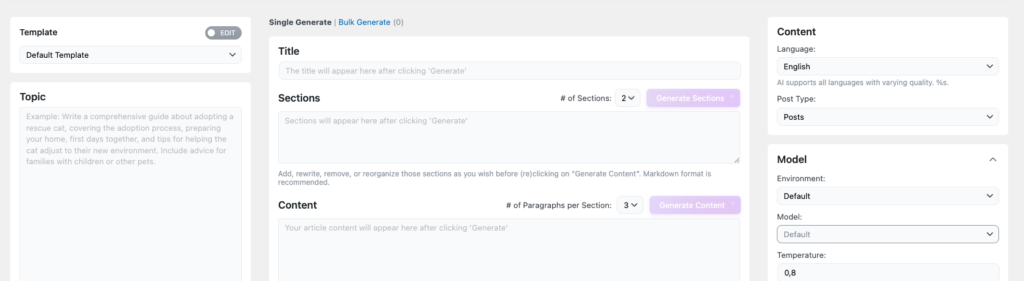
This feature does not include image generation for direct integration into your content.
Content Assistant
As the name suggests, this is not a direct content generation tool but rather an assistant tool. It adds Nyao as a popup chatbot within your post editor, allowing you to interact with it while you write.
With Nyao, you can ask for help refining your text, generating ideas, improving clarity, or rephrasing content in real time without leaving the editor, interact with blocks and more. This makes it a convenient companion for enhancing your writing workflow directly inside WordPress.
You can open the AI Engine Dashboard and, under Admin Modules, enable the AI Assistant.

Once you click the popup, a side panel will open where you can interact with the chat assistant. This feature works with the default WordPress content editor, Gutenberg, allowing you to get assistance directly while editing your posts or pages.
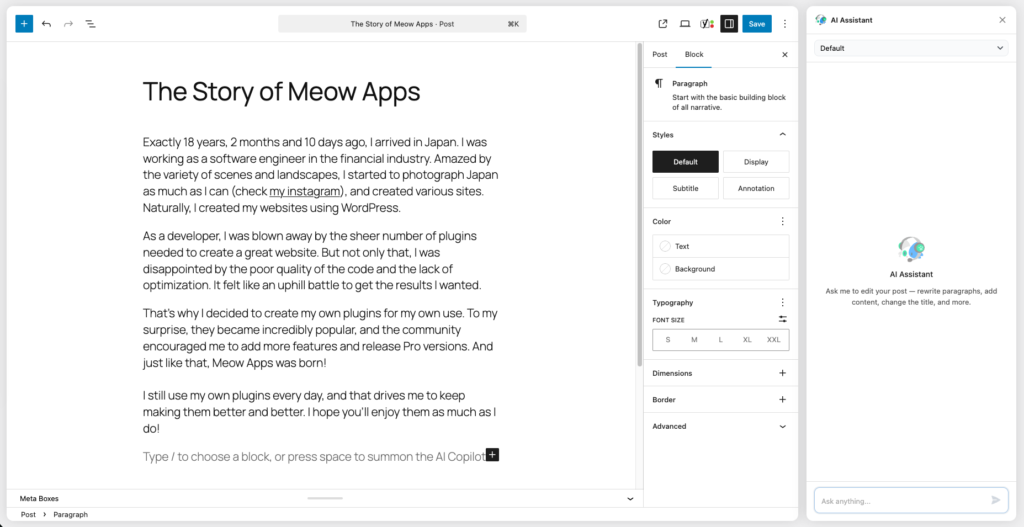
The assistant has access to your WordPress Media Library, allowing it to add and manipulate images directly within your content.
MCP
MCP (Model Context Protocol) is a standardized bridge that allows AI applications (clients) to easily access tools exposed by a service. In this case, AI Engine exposes these tools through your WordPress REST API, enabling the AI to interact with your WordPress site much like a user would. This includes performing actions such as creating content, retrieving data, and managing various aspects of your website directly through AI-driven workflows.
This is the most advanced post generation tool available to date. Although AI Engine MCP is not specifically designed to generate post content, its access to all WordPress core tools makes it the best overall solution for helping you write and produce high-quality content.
You can review and edit existing content, add/generate images, refactor text, explore new ideas, improve SEO, clean/analyze current content and more by taking advantage of a wide range of powerful features.
If you want to get started read here: AI Engine MCP